Split PDF Online Free
Upload a PDF, choose how to split it, and download the result — free, no sign-up, processed entirely in your browser.
Drag & drop a PDF here or click to select
PDF → Split PDF(s)Split PDF Online Free – Extract or Separate PDF Pages in Seconds
If you have ever needed to pull out one page from a long PDF, or break a whole document into single-page files, you know how annoying it can be to find a tool that actually does the job without asking you to sign up or install anything. This free PDF splitter lets you do exactly that. Upload your file, pick how you want it split, and your new PDF (or PDFs) download right away, all inside your browser.
What This Tool Does
This is a simple online PDF splitter built for two situations:
- Extract a page range – pull specific pages (like pages 2 to 5, or 1, 3, and 7 to 9) out of a larger PDF and save them as one new file.
- Split every page into its own PDF – turn a multi-page document into individual single-page files, downloaded one by one.
There is no software to install, no account to create, and no waiting for a server to process your file. Everything happens locally in your browser, so your document is never uploaded anywhere else. This makes it a genuinely private way to separate PDF pages, which matters if you are working with contracts, ID scans, invoices, or anything else you would rather not send to a random server online.
How to Split a PDF Online
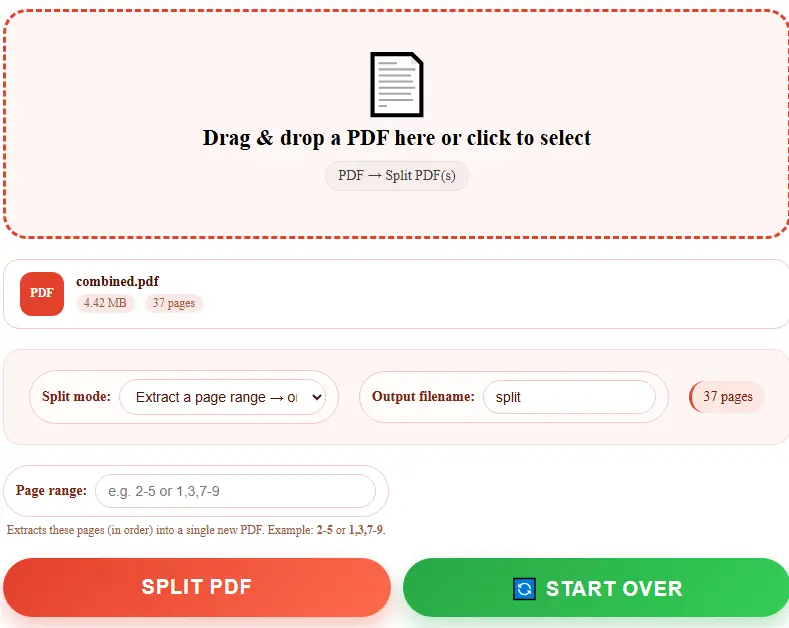
- Drag and drop your PDF into the upload box, or click it to choose a file from your device.
- Once it loads, you will see the file name, size, and total page count.
- Choose a split mode: extract a page range, or split every page into a separate file.
- If you are extracting a range, type it in using a simple format like
2-5or1,3,7-9. - Give your output file a name if you want something other than the default.
- Click Split PDF and your file (or files) will download automatically.
That’s the whole process. No email required, no watermark added, and no file size games designed to push you toward a paid plan.
Why Use a Free Online PDF Splitter?
Split and extract your PDF pages safely and instantly without installing software or paying premium subscription fees.
Works Entirely in Your Browser
Your PDF never leaves your device, so there’s no privacy risk from uploading sensitive documents to a third-party server.
No Sign-Up Needed
Open the tool and use it right away—no account, no email address, and no waiting for a verification link.
Handles Two Common Needs
Whether you want to extract a page range or split every single page into its own file, this tool covers both without switching apps.
Fast, Even on Larger Files
Because the splitting happens locally on your computer, you’re not waiting on file uploads or slow server queues.
Free with No Page Limits
Enjoy complete freedom with zero limits—there’s no page cap or paywall pushing you into a premium tier halfway through your document.
Common Reasons People Split PDFs
People end up needing to separate PDF pages for all kinds of reasons: pulling a single chapter out of an ebook, sending just one page of a contract instead of the whole thing, separating scanned ID pages, breaking a large report into sections for different team members, or isolating an invoice from a longer statement. Whatever the reason, the goal is usually the same — get just the pages you need, without extra software or a learning curve.
Frequently Asked Questions
Is this PDF splitter really free?
Yes. There’s no hidden fee, no page limit, and no trial period. You can extract pages or split a full PDF as many times as you need.
Do I need to create an account?
No. Just upload your PDF and start splitting. No email, no login.
Will my PDF be uploaded to a server?
No. The splitting happens directly in your browser using your device’s own processing power, so your file stays on your computer the whole time.
Can I split a password-protected PDF?
Password-protected or encrypted PDFs may not load correctly, since the tool needs to read the file’s pages to process it.
What page range formats are supported?
You can enter single pages, ranges, or a mix — for example 2-5, 1,3,7-9, or 4,6,10-12. Pages are extracted in the order you list them.
Does splitting reduce PDF quality?
No. The pages are copied exactly as they are in the original document, so there’s no loss of quality or formatting.
Try It Now
Skip the software downloads and skip the sign-up forms. Upload your PDF above, choose how you want it split, and get your file back in a few seconds — completely free, completely in your browser.