Compress PDF Online Free
Reduce PDF file size in seconds — pick a compression level, preview the savings, and download. No signup, processed entirely in your browser.
Drag & drop a PDF here or click to select
PDF → Smaller PDFCompress PDF Online for Free
A PDF that’s too large to email, too slow to upload, or bumping against a website’s file-size limit is one of those small annoyances that eats more time than it should. Desktop software can shrink a PDF, but most of it costs money or bundles a dozen features you’ll never touch. This compressor does one thing: it takes your PDF and makes it smaller, right in your browser, in the time it takes to read this sentence.
Unlike converters that upload your file to a remote server and email you a download link twenty minutes later, this tool processes everything on your own device. Your file is read, compressed, and downloaded locally it’s never transmitted anywhere. That’s worth knowing if you’re compressing a signed contract, a medical scan, a tax document, or anything else you’d rather not route through someone else’s server.
How to Compress a PDF
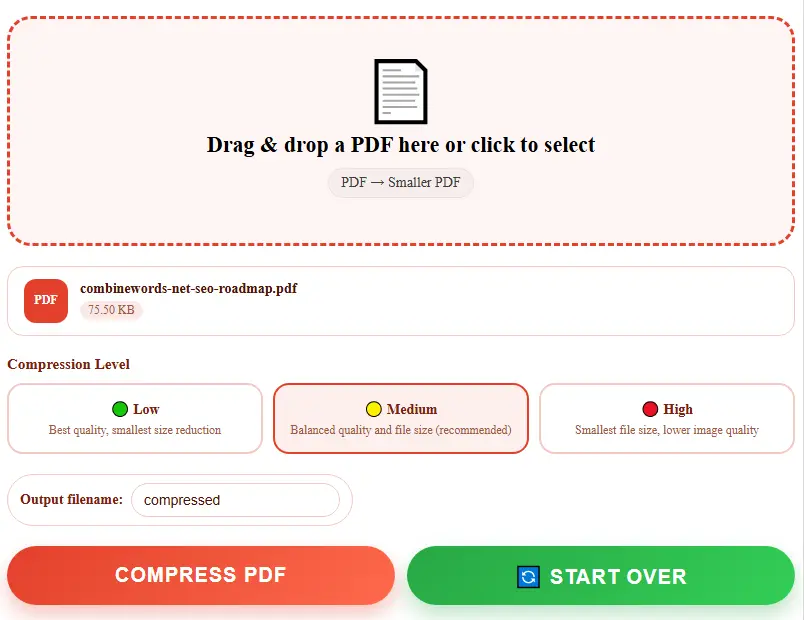
- Drag and drop your PDF into the upload box above, or click it to browse your device.
- Pick a compression level — Low, Medium, or High — depending on how much size reduction you need.
- Type a name for your output file, or leave the default.
- Click “Compress PDF.” You’ll see the exact before-and-after file size, and the download starts automatically.
That’s the whole process. No email verification, no watermark stamped across your pages, no “unlock full compression” upsell waiting at the end.
Why Choose Our PDF Compressor
See the Real Numbers
Most free compressors just hand you a download and hope you don’t check the file size. This one shows you the exact before-and-after — so you know precisely how much smaller your file got, not just that it “was compressed.”
Three Compression Levels
Low keeps quality close to the original for light size trims. Medium balances size and clarity for everyday sharing. High squeezes the file down as far as possible when a strict upload limit is the priority.
100% Private & Local
Your file is processed entirely in your browser. Nothing is uploaded, stored, or seen by anyone else.
Fast Compression
No server queue, no waiting for an email link. Most PDFs compress and download in a few seconds, right from the browser tab you’re already on.
Works Everywhere
Fully browser-based, so it works on Chrome, Safari, Firefox, and on any device — desktop, tablet, or phone.
Genuinely Free
No page limits, no daily caps, no forced sign-up, no watermark on your downloaded file.
This Tool vs Other Ways to Shrink a PDF
| Feature | This tool | Paid desktop software | Typical online compressors |
|---|---|---|---|
| Cost | Free | $50–$150/year | Often free, then paid tiers |
| File uploaded to a server | No | No | Usually yes |
| Shows exact size reduction | Yes | Sometimes | Rarely |
| Installation needed | No | Yes | No |
| Time for a 5MB file | Under 15 seconds | Under 30 seconds | 30–90 seconds |
| Compression level control | Yes (3 levels) | Yes | Sometimes, paywalled |
| Sign-up required | No | No | Often, for larger files |
Common Reasons People Compress a PDF
Job applicants often hit an email attachment limit when a portfolio or resume PDF creeps past 10-15MB — compressing it down gets it through without stripping out the work samples.Small business owners emailing scanned invoices, signed contracts, or shipping documents run into the same wall, especially when a scanner defaults to high-resolution color scans that balloon a two-page document into 20MB.
Students and researchers uploading assignments to portals with strict size caps use compression to fit large, image-heavy lecture PDFs or scanned textbook chapters under the limit.
Anyone building a website who needs to host downloadable PDFs — brochures, spec sheets, reports — compresses them first so the page doesn’t load painfully slowly for visitors on mobile data.
Things to Know Before Compressing
This tool reduces file size by re-rendering each page at a slightly lower resolution and recompressing the images, which is where most of a PDF’s file size actually lives especially in scanned documents or PDFs full of photos and graphics.
It works best on image-heavy files: scanned forms, photographed documents, PDFs exported from a scanner app, or reports with lots of embedded pictures.One trade-off worth knowing: because this method processes each page as an image, any text in your original PDF that was selectable or searchable will no longer be selectable in the compressed version — the page becomes a high-quality picture of itself rather than text plus images.
If you need to keep your text selectable and shrink the file, that requires different, more complex processing than a browser can do on its own. For scanned documents (which typically have no selectable text to begin with), this makes no difference at all.
If your original PDF is small or already well-optimized, don’t be surprised if compression barely changes the size, or even flags it as “already optimized” — that’s the tool being honest rather than shrinking a file that has nothing left to trim.
Frequently Asked Questions
Is this PDF compressor really free?
Yes. There’s no charge, no trial period, and no hidden premium tier. Compress as many files as you need at no cost.
Do I need to create an account or sign in?
No account or email address is needed. Open the page, upload your file, and download the result.
Are my files uploaded to a server?
No. Compression runs entirely inside your browser on your own device. Your PDF is never sent over the internet.
How much smaller will my file get?
It depends heavily on what’s inside the PDF. Scanned or image-heavy documents often shrink by 60-80%. PDFs that are mostly plain text with few images will shrink much less, since there isn’t much image data to compress in the first place.
Will my PDF still look the same after compressing?
At Low and Medium settings, the difference is usually hard to notice at normal zoom levels. High compression trades more visible quality for a smaller file — good for a strict size limit, less ideal if the document needs to look sharp when printed.
Will the text still be selectable and searchable after compression?
No. This method turns each page into a recompressed image to achieve real file-size savings, so text that was selectable in the original PDF won’t be selectable afterward. If you need to keep searchable text, compress a copy and keep your original for that purpose.
Can I compress more than one PDF at once?
Currently this tool compresses one PDF per pass, so you get full control over the compression level for each file individually.
Does this work on mobile phones?
Yes, it works in any modern mobile browser on Android and iPhone, as well as on desktop and laptop computers.