Convert PDF to JPG Online – Free PDF to Image Converter
Upload your PDF files, arrange the order, and turn every page into a high-quality JPG image — free, no sign-up, processed entirely in your browser.
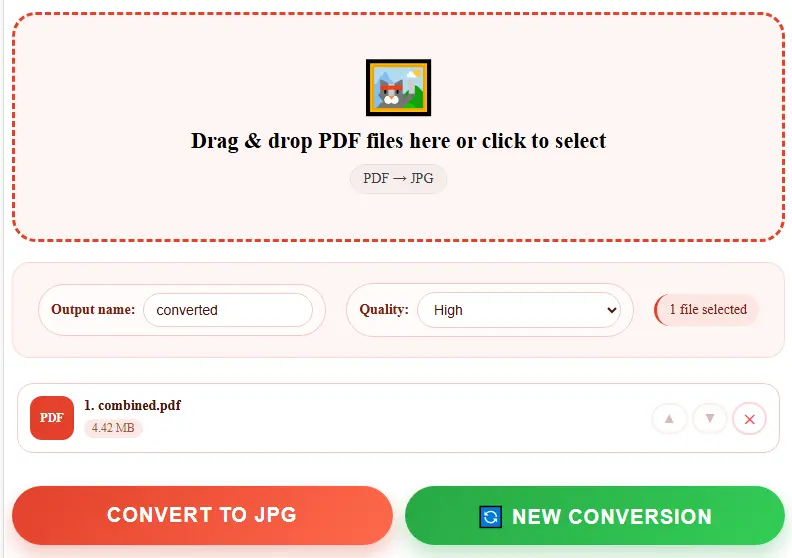
Drag & drop PDF files here or click to select
PDF → JPGConvert PDF to JPG Online for Free
Sometimes a PDF page needs to become a plain image for a website, a slideshow, a social media post, or an email that doesn't handle attachments well. This tool turns every page of a PDF into a sharp JPG image directly in your browser. There's no software to install, no account to create, and no limit on how many pages or files you convert.
Most "free" PDF-to-JPG sites work by uploading your document to a remote server, converting it there, and sending the images back. This tool skips that step entirely. Your PDF is opened and rendered to images using your own browser's engine, so the file itself never leaves your device. That's a meaningful difference if you're converting personal documents, signed forms, ID scans, or anything else you'd rather keep off a stranger's server.
How to Convert a PDF to JPG
- Drag and drop your PDF (or several PDFs) into the upload box above, or click to browse.
- Reorder or remove files if you've added more than one.
- Pick an image quality — Standard for smaller file size, Maximum for the sharpest detail.
- Click "Convert to JPG." A single page downloads as one .jpg; multiple pages download together as a .zip file.
Why Use This PDF to JPG Converter
No File Uploads
Every page is rendered locally in your browser — nothing is sent to a server.
No Account Required
Convert instantly with no login, no email address, and no waiting for a confirmation link.
Adjustable Quality
Choose between standard, high, and maximum quality depending on whether you need a small file or the sharpest possible image.
Batch Conversion
Convert multiple PDFs at once and get every page bundled into a single .zip download.
No Page Limits
Convert a one-page flyer or a 200-page report — there's no cap, no watermark, and no forced upgrade.
Fast & Instant
No waiting on a server queue. Most files convert and download in a few seconds, right from your browser tab.
This Tool vs Other Ways to Get Images from a PDF
| Feature | This tool | Screenshot each page | Paid desktop software | Typical online converters |
|---|---|---|---|---|
| Cost | Free | Free | $30–$100/year | Often free, then paid tiers |
| File uploaded to a server | No | No | No | Usually yes |
| Image quality | Sharp, adjustable | Depends on screen resolution | Sharp, adjustable | Varies, often fixed |
| Time for a 10-page file | Under 15 seconds | 10+ minutes | Under 30 seconds | 30–60 seconds |
| Batch/zip download | Yes | No | Yes | Sometimes, paywalled |
| Sign-up required | No | No | No | Often, for higher limits |
Common Uses for a PDF to JPG Converter
- Online sellers and marketers convert a PDF catalog or flyer into JPGs so pages can be posted directly on social media or a product listing, where PDFs usually aren't supported.
- Students and educators pull a diagram, worksheet page, or chart out of a PDF textbook to drop straight into a slide deck or a printed handout.
- Freelancers and designers turn a signed contract or a design proof from PDF into an image to share in a chat app or embed in a portfolio.
- Anyone dealing with old scans uses it to break a multi-page scanned PDF into individual page images for editing, cropping, or archiving separately.
A Note on Image Quality
Each page is rendered at roughly double the standard resolution before being saved as a JPG, so text and fine details stay legible even after conversion. The "Standard" setting produces smaller files that are fine for quick sharing, while "Maximum" keeps as much visual detail as possible at the cost of a larger file size useful when a page will be printed or zoomed into later. Because JPG doesn't support transparency, any transparent areas in the original PDF are filled with white in the output image, which matches how most PDF pages are designed anyway.
Frequently Asked Questions
Is this PDF to JPG converter free?
Yes, completely free with no page limits, no daily cap, and no watermark added to your images.
Do I need to sign up or install anything?
No. It runs directly in your browser tab — just upload a PDF and download the result.
Are my PDF files uploaded anywhere?
No. Every page is rendered to an image on your own device. Your file is never sent over the internet.
What happens if my PDF has multiple pages?
Each page becomes its own JPG image. If there's more than one page (or more than one file), all the images are bundled into a single .zip file so you get one download instead of dozens.
Can I control the image quality?
Yes. Choose Standard for smaller files, High for everyday use, or Maximum for the sharpest possible image — useful if you plan to print or zoom in later.
Will the JPG look exactly like the PDF page?
Yes. Each JPG is a direct visual render of that page, including text, images, and layout — it looks identical to what you'd see opening the PDF itself.
Can I convert more than one PDF at a time?
Yes. Add multiple files, reorder them as needed, and convert them all in one go.
Does this work on phones and tablets?
Yes, it works in any modern mobile browser on Android and iPhone, as well as on desktop and laptop computers.