Convert PDF to Word Online – PDF to DOCX Converter
Upload your PDF files, arrange the order, and convert them into an editable Word document — free, no sign-up, processed entirely in your browser.
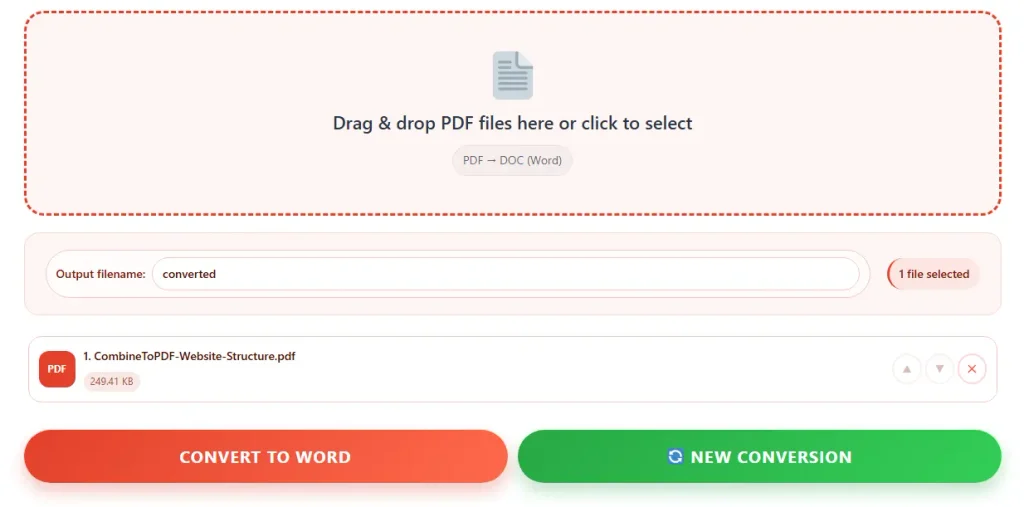
Drag & drop PDF files here or click to select
PDF → DOC (Word)Convert PDF to Word Online for Free
Turning a PDF into an editable Word document usually means one of two things paying for expensive desktop software, or spending twenty minutes copying and pasting text by hand and fixing broken formatting afterward. This PDF to Word converter skips both of those problems. Upload one or more PDF files, arrange them in the order you want, and download a Word-compatible document in seconds. There's nothing to install, nothing to sign up for, and no daily conversion limit.
Unlike most "free" PDF converters that quietly upload your documents to a remote server, this tool processes everything directly inside your web browser. Your files are read, converted, and downloaded on your own device they're never transmitted anywhere. That matters if you're converting contracts, resumes, invoices, tax forms, or anything else you'd rather not send through a third-party server.
How to Convert a PDF to Word
- Drag and drop your PDF file (or files) into the upload box above, or click it to browse your device.
- Reorder or remove files using the arrows if you've added more than one PDF.
- Type a name for your output file, or leave the default.
- Click "Convert to Word" and the download will start automatically.
That's the entire process. There's no email verification step, no watermark added to your file, and no "premium" version hiding behind a paywall.
Why Choose Our PDF to Word Converter
Accurate Text Extraction
Reads the real text inside your PDF — paragraphs and page order carry over cleanly instead of turning into a jumbled mess.
100% Private & Local
Your file is processed entirely in your browser. Nothing is uploaded, stored, or seen by anyone else.
Combine Multiple PDFs
Add several PDFs, reorder them, and convert them into a single Word document in one pass.
Fast Conversion
No waiting on a server queue. Most files convert and download in a few seconds, right from your browser tab.
Works Everywhere
Fully browser-based, so it works on Chrome, Safari, Firefox, and on any device — desktop, tablet, or phone.
Genuinely Free
No page limits, no daily caps, no forced sign-up, no watermark on your downloaded file.
This Tool vs Other Ways to Convert a PDF
| Feature | This tool | Copy-paste manually | Paid desktop software | Typical online converters |
|---|---|---|---|---|
| Cost | Free | Free | $50–$150/year | Often free, then paid tiers |
| File uploaded to a server | No | No | No | Usually yes |
| Installation needed | No | No | Yes | No |
| Time for a 5-page file | Under 10 seconds | 15–20 minutes | Under 30 seconds | 30–60 seconds |
| Batch conversion | Yes | No | Yes | Sometimes, paywalled |
| Sign-up required | No | No | No | Often, for higher limits |
Common Uses for a PDF to Word Converter
- Students and researchers convert PDF textbooks, lecture slides, or research papers into Word so they can highlight, comment, and quote passages directly instead of retyping citations by hand.
- Job seekers often receive their own resume back as a PDF from a recruiter or LinkedIn export and need it in Word format to make quick edits before applying to a new role.
- Small business owners use it to pull an old contract, invoice template, or proposal out of PDF form so it can be updated with new terms, pricing, or client details.
- HR and admin teams convert scanned forms and policy documents into Word so multiple people can edit and track changes collaboratively.
Things to Know Before Converting
This converter extracts the text content of your PDF and rebuilds it as a Word document, preserving paragraph breaks and page order. It works best on PDFs that were originally created from a word processor, an export from Word or Google Docs, or a digitally generated invoice or report. Scanned documents — photos of paper pages saved as a PDF don't contain real text for the browser to read, so they won't convert cleanly without OCR (optical character recognition) software. Complex layouts with multiple columns, tables, or heavy graphic design may also need some manual formatting cleanup after conversion, which is true of virtually every PDF-to-Word tool, free or paid.
Frequently Asked Questions
Is this PDF to Word converter really free?
Yes. There's no charge, no trial period, and no hidden premium tier. You can convert as many files as you need at no cost.
Do I need to create an account or sign in?
No account or email address is needed. Open the page, upload your file, and download the result.
Are my files uploaded to a server?
No. The conversion runs entirely inside your browser on your own device. Your PDF is never sent over the internet, which also means it works without exposing sensitive documents to a third party.
What file format do I get after converting?
You'll receive a Word-compatible .doc file that opens directly in Microsoft Word, Google Docs, LibreOffice Writer, and most other word processors.
Can I convert a scanned PDF to Word?
This tool reads the actual text inside a PDF. If your PDF is a scan or photo of a document with no selectable text, there's nothing for it to extract you'd need an OCR tool first to turn the scanned image into readable text.
Will the formatting stay exactly the same?
Paragraphs, page order, and basic text structure carry over. Very complex layouts — multi-column pages, embedded tables, or heavily designed graphics may need light formatting touch-ups afterward, which is typical of any PDF-to-Word conversion, online or paid.
Can I convert more than one PDF at once?
Yes. Upload multiple files, reorder them as needed, and they'll be combined into a single Word document.
Does this work on mobile phones?
Yes, it works in any modern mobile browser on Android and iPhone, as well as on desktop and laptop computers.