Delete Pages from PDF Online Free
Remove unwanted pages from your PDF — preview every page visually, select the ones to delete, and download instantly. No signup required.
Drag & drop a PDF here or click to select
PDF → PDF (pages removed)Delete Pages from PDF – Remove Unwanted Pages Free
Need a fast way to delete pages from a PDF online? You’ve come to the right place. Our free PDF page remover lets you preview every page visually, select exactly which ones you want gone, and download a clean, updated file in seconds no software, no signup, no watermark.
Whether you need to remove a blank page from a scanned document, cut out a duplicate page, or trim down a long report before emailing it, this tool handles it directly in your browser. Your file is never uploaded to any server everything happens locally on your device, so your documents stay completely private.
How to Delete Pages from a PDF Online
Removing pages from a PDF file is easier than most people think. You don’t need Adobe Acrobat or any paid software — just three simple steps:
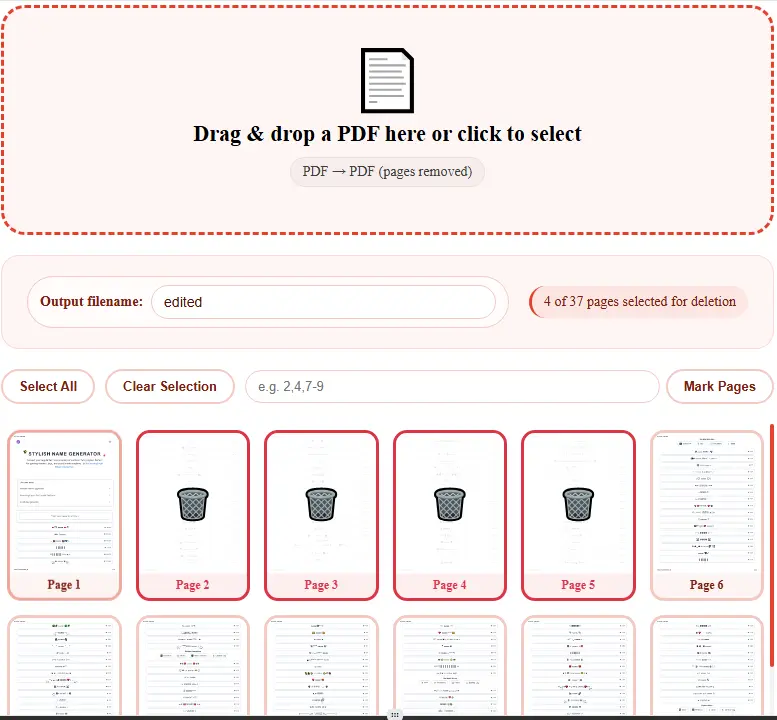
Step 1: Upload Your PDF Click the upload box or drag and drop your file. Within seconds, every page of your document will render as a visual thumbnail, so you can actually see what you’re deleting instead of guessing from a plain list.
Step 2: Select the Pages to Remove Click on any page thumbnail to mark it for deletion it’ll show a red overlay so there’s no confusion. Need to remove several pages at once, like pages 3, 7, and 10 through 14? Just type 3,7,10-14 into the range box and they’ll all be marked instantly.
Step 3: Download Your Edited PDF Once you’re happy with your selection, hit “Delete Pages & Download.” Your new PDF with the unwanted pages removed downloads immediately, with all remaining pages kept in their original order and quality.
Why Choose Our PDF Page Remover
Visual Page Preview
See every page before you decide. Most free tools only show a numbered list; we render each page so you know exactly what you’re removing.
100% Private & Local
Your file is processed entirely in your browser. Nothing is uploaded, stored, or seen by anyone else.
Range Selection
Deleting 10 pages one by one is tedious. Type a range like 2,5,8-12 and select them all at once.
No Quality Loss
The remaining pages keep their original resolution, formatting, and structure — nothing gets recompressed or altered.
Works Everywhere
Fully browser-based, so it works on Chrome, Safari, Firefox, and on any device — desktop, tablet, or phone.
Genuinely Free
No page limits, no daily caps, no forced sign-up, no watermark on your downloaded file.
Feature Comparison
| Feature | Our Tool | Other Online PDF Editors |
|---|---|---|
| Cost | 100% Free | Often limited or paid |
| Registration | Not Required | Sometimes required |
| Page Preview | Visual thumbnails | Often just page numbers |
| Bulk Selection | Range input (e.g. 2-9) | Usually one-by-one only |
| Privacy | Processed in-browser | Often uploaded to server |
| File Size Limit | No limit | Often capped |
Common Reasons People Remove PDF Pages
- Cleaning up scanned documents — Remove blank or duplicate pages that scanners often add by mistake.
- Trimming long reports — Cut out sections, appendices, or cover pages you don’t need before sharing.
- Removing sensitive pages — Take out pages containing personal or confidential information before forwarding a document.
- Fixing merged PDFs — If you combined multiple files and ended up with an extra or misplaced page, remove it without starting over.
- Preparing documents for print — Delete pages you don’t want printed to save paper and ink.
Frequently Asked Questions
How do I delete a page from a PDF for free?
Upload your PDF, click on the page thumbnail you want to remove (it’ll turn red), and click “Delete Pages & Download.” Your edited file downloads instantly completely free, no signup needed.
Can I remove multiple pages from a PDF at once?
Yes. You can either click multiple thumbnails individually, use “Select All” and then unmark the ones you want to keep, or type a page range like 2,4,7-9 into the range box to mark several pages in one go.
Is it safe to delete pages from a PDF online?
Yes our tool processes everything directly in your browser. Your file is never uploaded to a server, so it stays completely private throughout the process.
Will deleting pages affect the quality of the remaining pages?
No. Only the selected pages are removed — every remaining page keeps its original resolution and formatting exactly as it was.
Can I undo a page deletion after downloading?
Once downloaded, the new file is final. However, your original PDF is never modified or deleted from your device — you can always re-upload it and start over if you change your mind.
What’s the maximum number of pages I can remove?
There’s no limit. You can select and delete as many pages as you like, as long as at least one page remains in the final document.
Do I need to install any software?
No. Everything runs directly in your web browser — no downloads, no installations, no browser extensions required.